Accessibility widget won't stay hidden - Site Help, Tips & Tricks - Eat Your Books

Forum

Welcome Guest! You can not login or register.

Notification

Icon
Error

2 Pages12>
Accessibility widget won't stay hidden   Go to last post Go to last unread
#1 Posted : Saturday, February 3, 2024 7:48:22 AM(UTC)

I have tried to hide the annoying green spot but it keeps coming back. I have selected hide indefinitely but it returns within a couple of minutes. I tried logging out and back in but it didn't help. Please fix this as it's really irritating me. 

#2 Posted : Saturday, February 3, 2024 3:34:54 PM(UTC)

I'm having the same problem - on my computer and on my iPad.

#3 Posted : Saturday, February 3, 2024 9:59:40 PM(UTC)
Me too. Exact same issue on my phone.
#4 Posted : Saturday, February 3, 2024 11:19:59 PM(UTC)

I will contact the widget producer and ask them for help on this issue. It would be helpful if members could do the following and see if the issue persists. Delete your browser cache/history and then do a hard refresh on the page that has the widget icon. See if it then disappears. If you still have the issue please could you post here what browser you use.

#5 Posted : Sunday, February 4, 2024 3:07:28 AM(UTC)

Sorry, it made no difference. I'm using my phone, with Samsung Internet. 

#6 Posted : Sunday, February 4, 2024 9:35:12 AM(UTC)

Just to add, "hide widget indefintely" worked perfectly on my laptop, seems to have worked on my iPhone 12 mini (I hid it a few minutes ago then signed out...waited a bit and then signed back in again - it didn't reappear)  but it doesn't want to stay hidden on my iPad.    Not a big deal for me but I can see how some would find it distracting.

#7 Posted : Sunday, February 4, 2024 7:11:36 PM(UTC)
On my iPhone I cleared everything and signed out and in again. If I hide widget indefinitely it pops back up again as soon as I go to a new page. I’ve gone thru this numerous times and didn’t manage to hide widget for more than a few minutes each time.
#8 Posted : Monday, February 5, 2024 9:44:06 AM(UTC)

I just checked my iphone....the widget has reappeared.

#9 Posted : Monday, February 5, 2024 10:56:14 AM(UTC)

I've just used the widget for the first time, having finally found it bottom left of screen (it's usually top right).


No idea why someone (I appreciate nothing to do with EYB) chose that symbol for accessibility, it seems unrelated to what it does,


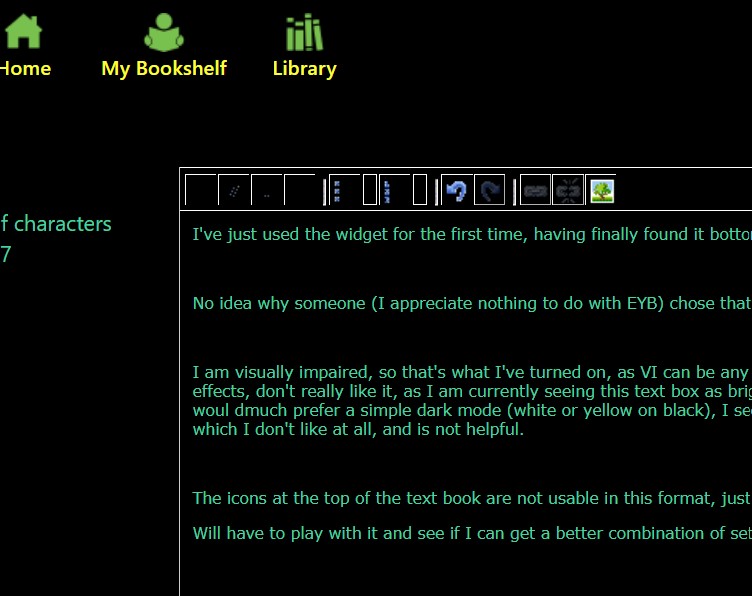
I am visually impaired, so that's what I've turned on, as VI can be any one of hundreds of conditions not sure how they selected th effects, don't really like it, as I am currently seeing this text box as bright green on black but tiny characters, which isn't helpful, woul dmuch prefer a simple dark mode (white or yellow on black), I seem to be getting text in different areas in different colours, which I don't like at all, and is not helpful.


The icons at the top of the text book are not usable in this format, just the outlines visible apart from the image pic 


Will have to play with it and see if I can get a better combination of settings - I've attempted to post a screensot, which is very difficult as the popups have test in a rainbow of unhelpful colours


#10 Posted : Monday, February 5, 2024 10:59:38 AM(UTC)

Oh that's weird - I turned off the accessibility widget after I'd posted, but it looks as if the text I typed with them turned on is displaying in contrast, the screen shot should show you what I was seeing at the time

#11 Posted : Tuesday, February 6, 2024 4:36:18 AM(UTC)

Me again. 


There are fewer Profiles available on iPad (I was using my Windows above) and I can't see the VI profile as an option here. 

#12 Posted : Friday, February 9, 2024 2:08:38 PM(UTC)
Just because it might help, I can't get ride of the button permanently, either. Nor do I have the full set of accessibility profiles. I can see motor impaired, blind, dyslexia, and cognitive, but not the other four. I am using Firefox 122.0.1 on a Mac. It sounds like this is mostly Apple software?
#13 Posted : Friday, February 9, 2024 4:53:44 PM(UTC)
I'm using Firefox 122.0.1 on my Macs. The accessibiluty button is permanently gone from my pages though it did take a couple of goes; there seems to be no sharing of one's setting from the blog to the other areas.
#14 Posted : Sunday, February 11, 2024 11:30:26 PM(UTC)
I retract my previous comment. The widget is back. 😞
#15 Posted : Tuesday, February 13, 2024 3:48:04 PM(UTC)
I cannot get rid of it, no matter how many times I click on the X. I hate it!! Is there any way to get rid of it permanently? Adding it was not helpful!
#16 Posted : Tuesday, February 13, 2024 5:24:55 PM(UTC)

Tinala523 - the accessibility widget was installed to help members with disabilities. It may not be helpful for you but we hope it is for those members. Our developers are currently trying to work out why the icon reappears for some members.

#17 Posted : Wednesday, February 14, 2024 1:10:20 PM(UTC)

I understand the purpose now, thank you.  Please just make the "X" work so.i can get rid of the text box!  Also, lately the pictures are not coming up.  Is that only me?

#18 Posted : Wednesday, February 14, 2024 4:47:35 PM(UTC)

When you say "the pictures are not coming up" do you mean that you aren't seeing recipe and book cover images? I cannot reproduce this issue and no other member has reported it so it may be a browser issue at your end. Make sure you have the lastest version of your browser installed and delete your browser cache/history. Try doing a page refresh (click the circular arrow to the left or right of the URL bar) when you see it happen again.

#19 Posted : Monday, February 26, 2024 9:22:56 AM(UTC)

I have feedback from our developers on the issues noted above.


  1. Widget not staying hidden - if members clear the website data and cache from their browser, the widget will reappear because the widget recognizes the user's device using the widget settings stored on the website data and cache of the browser.  If they clear the website data and cache after applying the setting then they have to set the widget setting again to hide it. Some members may have their settings to automatically clear cache so may not even be aware it is happening.

  2. Formatting of Forum posts - all the text editors ('YAF' text editors in the case of the EYB Forum) provide the text formatting and editing functionalities based on a combination of CSS (Cascading Style Sheets - Used for UI designing) and HTML. It includes any text formatting like bold, italic, underline, text color, size, background, inserting horizontal-vertical lines, tables, images, etc. So a Forum post will appear using the same formating of the site settings the member chooses. That means you will need to reset the widget before posting for it not to appear with your own accessibility settings.

  3. Only 4 profile options appearing on a phone vs 8 on a laptop - the remaining 4 profiles are only shown on desktop/laptop as most of their functionality works with Cursor design, Reading masks, and Tooltip text on the hovering mouse pointer to read content. Phones work with touchscreens, unlike cursors. Another reason is that each phone and browser brand has its own built-in accessibility features, so some may be disabled depending on the phone and browser brand.


I hope this helps.

#21 Posted : Monday, February 26, 2024 12:29:31 PM(UTC)
Hi Jane,

I am on a Mac laptop running Monterey and Firefox and I only have the 4 accessibility profiles. This does not matter to me. However, if your developers are interested, I would be happy to chat with them and see if we can figure out why. It might be something specific to my setup, but it also might not.

2 Pages12>
You cannot post new topics in this forum.
You cannot reply to topics in this forum.
You cannot delete your posts in this forum.
You cannot edit your posts in this forum.
You cannot create polls in this forum.
You cannot vote in polls in this forum.